Space calendars
A space calendar belongs to a Confluence space, not to a page. Create one for launches, time off or on-call weeks, choose who can see and change it, and show it on any page.
Before you begin
- Event Planner for Confluence is installed on your site.
- To create a calendar, you need permission to add content in the space.
- Your Confluence admin hasn't turned off calendar creation. See The admin page.
Open the space's calendars
- Go to the space.
- In the space's sidebar, under Space apps, select Event Planner.
Result: The list shows every calendar in the space that you're allowed to see, with its next event, owner, last update and access.
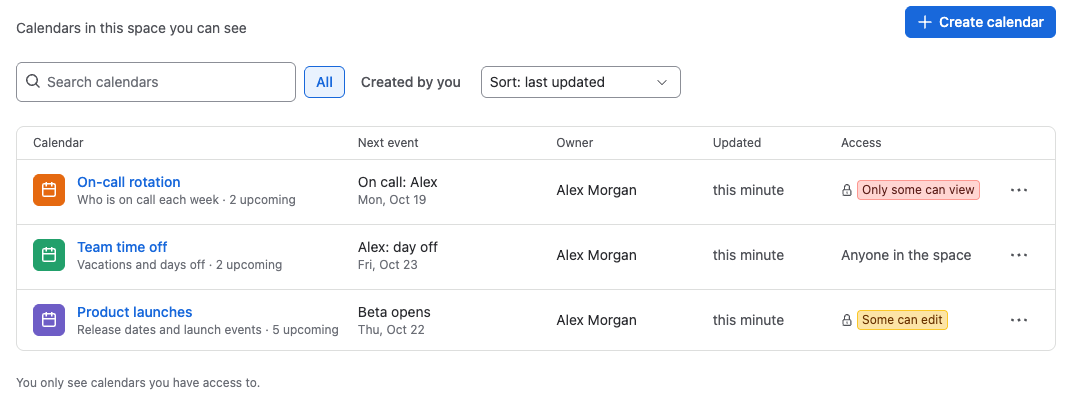
To find a calendar, type in Search calendars, select Created by you, or change the sort to Sort: name or Sort: newest. Select a calendar's name to open it.
Create a calendar
-
Select Create calendar.
-
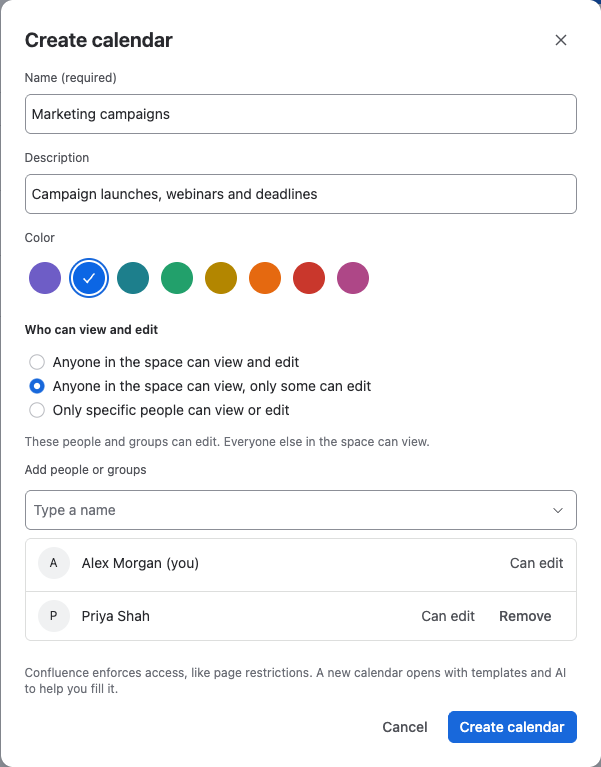
In Name, type a name, for example
Product launches. -
Optionally, add a Description and pick a Color. The color marks the calendar in the list.
-
Under Who can view and edit, choose who gets access. See Choose who can see and change a space calendar.
-
Select Create calendar.
Result: The new calendar opens and offers templates and Create with AI to fill it. You're its owner.
Work with a space calendar
A space calendar works like any other calendar: add, drag and change events, switch views and export. Its page adds:
- the owner and the last change, under the name,
- the access button (for example Anyone in the space), which opens Restrictions for people who can edit,
- Copy link, to share the calendar,
- a More actions menu (•••) with Edit details, History, Export, Calendar settings and Move to trash.
People who can view but not edit see You can view this calendar. To change events, ask its owner for edit access.
Space calendars don't have the lock. To stop people from changing a calendar, limit who can edit it. See Choose who can see and change a space calendar.
Related
- Embed a space calendar on a page: show the calendar on your team's home page.
- Version history, details and trash: restore an earlier version or remove a calendar.
- Share a team calendar across a space: a full example.