Choose who can see and change a space calendar
Set who can view and edit a space calendar when you create it, or change it later. Event Planner uses Confluence restrictions, so Confluence enforces them like page restrictions.
Before you begin
- You need permission to edit the calendar.
- To limit access, you need the space's Restrictions permission. Space admins have it. Without it, you can only create calendars that anyone in the space can view and edit.
The three access options
| Option | Who can view | Who can edit | Label in the list |
|---|---|---|---|
| Anyone in the space can view and edit | Everyone with access to the space | Everyone the space permissions allow | Anyone in the space |
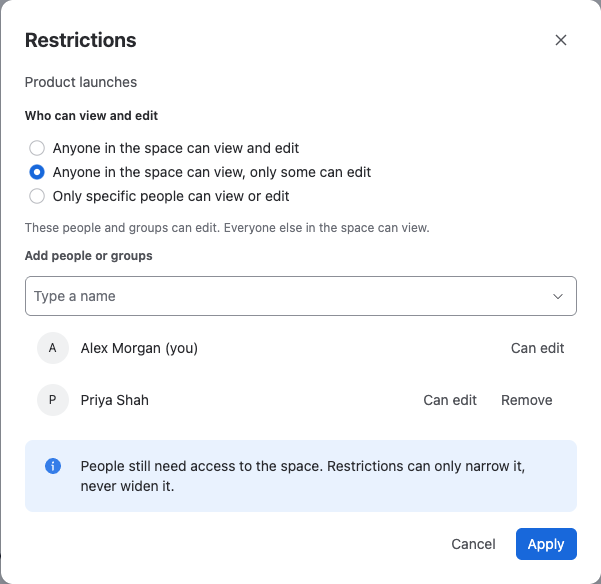
| Anyone in the space can view, only some can edit | Everyone with access to the space | Only the people and groups you add | Some can edit |
| Only specific people can view or edit | Only the people and groups you add | The people and groups you add with Can edit | Only some can view |
Restrictions only narrow access. People still need access to the space itself, and you can't grant access to someone the space doesn't allow. You're always on the list as an editor, so you can't lock yourself out.
Change who can access a calendar
-
Open the calendar.
-
Select the access button next to the calendar's name, for example Anyone in the space. You can also select ••• > Manage access on the calendar's row in the list.
-
Choose an option under Who can view and edit.
-
For a limited option, type a name under Add people or groups, select the person or group, and choose Can edit or Can view for each one.
-
Select Apply.
Result: A message confirms the new access, and the button shows the new label. People who lose access no longer see the calendar in the list, on its page or in embeds.
What people without access see
- The calendar isn't in their list of space calendars.
- Its link shows You can't open this calendar, without the calendar's name or owner.
- An embed of it shows You can't see this calendar, without the name or owner.
Related
- Space calendars: create and find space calendars.
- The admin page: set the access that new calendars start with.
- Permissions: every permission Event Planner checks.