📂 Mermaid Diagrams
 | Mermaid Diagrams draws flowcharts, sequence diagrams, Gantt charts, architecture maps and more on Confluence pages and Jira work items. You write a few lines of Mermaid code, and the diagram appears for everyone who can see the page or work item. |
|---|
Get started: install the app and add your first diagram in about 5 minutes.
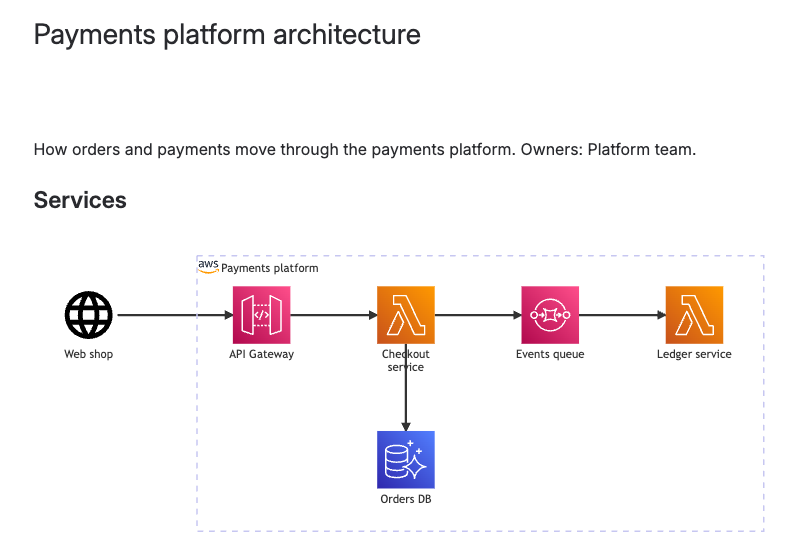
Why teams use it
- Diagrams that stay current. A diagram is text, so updating it means changing a line, not redrawing boxes. Anyone who can edit the page can fix it in seconds.
- Next to the work. The diagram sits on the Confluence page or Jira work item it explains, not in a separate tool or an outdated image.
- The same code everywhere. The app uses Mermaid 12.1, like the official Mermaid Live Editor, GitHub and GitLab. Code you copy from those places looks the same here.
- Fast to start. Pick one of 35 ready-made snippets, import from Mermaid Live or a Markdown file, or let an AI assistant draft the code.
- Safe for your data. The app runs on Atlassian Forge and keeps diagrams in your site. Confluence and Jira permissions decide who sees and edits them.
Who it's for
- Engineers and architects document services, APIs, data models and Git branching right where the team reads them.
- Product and project managers keep release plans, timelines and roadmaps on the planning page.
- Business analysts and operations teams map processes, approval flows and swimlanes on the work item that changes them.
- Technical writers keep diagrams in the docs as text, with no image files to redraw after every change.
What you get in each product
| Feature | Confluence | Jira |
|---|---|---|
| Where diagrams live | The Mermaid Diagram macro, anywhere on a page or blog post | The Mermaid Diagrams panel on a work item |
| Mermaid code already in your content | Drawn as diagrams, and turned into macros in one step | Drawn as diagrams, and edited in place in the description or comment |
| Editor, snippets, import, Draft with AI | Yes | Yes |
| Several diagrams in one macro or panel | Yes | Yes |
| Full screen, PNG, SVG and clipboard export | Yes | Yes |
| Marketplace app | Mermaid Diagrams Macro for Confluence | Mermaid Diagrams for Jira |
The two apps are separate Marketplace listings. Install the one for each product you use.
Documentation
| Section | What you'll find |
|---|---|
| Get started | Install the app and add your first diagram in Confluence or Jira |
| Use cases | Architecture docs, process maps, release plans, and moving existing Mermaid in |
| Create and work with diagrams | Add diagrams, use the editor, snippets and import, and view and export diagrams |
| Mermaid code in your content | Draw and edit the Mermaid code blocks already on pages and work items |
| Themes, looks and layouts | Set colors, drawing style and layout in the diagram code |
| AI | Draft diagrams with AI, and have an AI assistant write whole pages with diagrams |
| Administration | Install and update, the admin page, permissions and licensing |
| Reference | Supported diagram types and known limitations |
| Data security and privacy | What the app stores, where data goes, and the app's permissions |
| Troubleshooting and FAQ | Fixes for common problems, and short answers |
What's new
- Q4 2026: Mermaid 12 with new looks and dark mode, import from Mermaid Live and Markdown, Mermaid code blocks drawn as diagrams, and a redesigned editor. Details
- Q3 2026: AI assistants can create Confluence pages with diagrams already drawn on them. Details
- All changes
Get help
- Contact support with the product (Confluence or Jira), what you did, and the diagram code if you can share it.
- Mermaid Diagrams Macro for Confluence and Mermaid Diagrams for Jira on the Atlassian Marketplace