Map a process on a Jira work item
Draw who does what in a process, right on the Jira work item where the team discusses and changes it.
Problem: A process change is agreed in comments, but nobody can see the whole process at once. Support, Finance and Engineering each picture a different version.
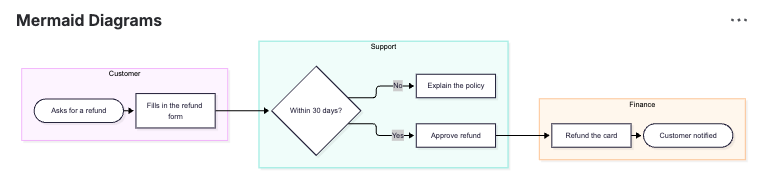
Solution: Add the Mermaid Diagrams panel to the work item and draw the process as a swimlane. Each team gets its own lane, and the diagram changes with the discussion.
What you'll need
- Mermaid Diagrams for Jira, installed on your site. See Get started.
- The Edit work items permission in the space.
Set it up
-
Open the work item.
-
Under the summary, select View app actions (the apps icon) > Mermaid Diagrams. The panel is added and the diagram editor opens.
-
Type or paste a flowchart where each
subgraphis a lane, and replace the lanes and steps with your own:flowchart LRsubgraph CustomerA([Asks for a refund]) --> B[Fills in the refund form]endsubgraph SupportB --> C{Within 30 days?}C -- No --> D[Explain the policy]C -- Yes --> E[Approve refund]endsubgraph FinanceE --> F[Refund the card]F --> G([Customer notified])end -
Select Save and close.
What your team will experience
- Everyone who opens the work item sees the process in the Mermaid Diagrams panel, without opening another tool.
- A teammate proposes a change in a comment, then selects Edit diagram and adds the step.
- When two people save at the same time, the second one is asked what to do instead of silently replacing the other's change. See When someone else saved first.
The Swimlane Process snippet draws lanes with Mermaid's newer swimlane-beta type, if you prefer it to subgraphs. For a process that moves through statuses, such as a bug's lifecycle, try the State Diagram snippet. If your team already pastes Mermaid code blocks into descriptions or comments, the app draws those too. See Edit Mermaid code blocks in Jira.
Check that it works
- Reload the work item and confirm the diagram shows in the Mermaid Diagrams panel.
- Hover over the diagram and select Export > Copy image to clipboard, then paste it into a chat or a slide.
Related
- Add diagrams to a Jira work item: show the panel on every work item, collapse it or remove it.
- Start from a snippet: the 35 ready-made diagrams.
- Themes, looks and layouts: give the process a hand-drawn look or your own colors.