When someone else saved first
When two people edit the same macro or panel at once, the second save doesn't silently replace the first. The editor stops and asks you what to do.
What you see
You select Save or Save and close, and a dialog says, for example, Sam Lee changed this diagram since you opened it. It names who saved, when, and which diagrams they changed. The app hasn't saved anything of yours yet.
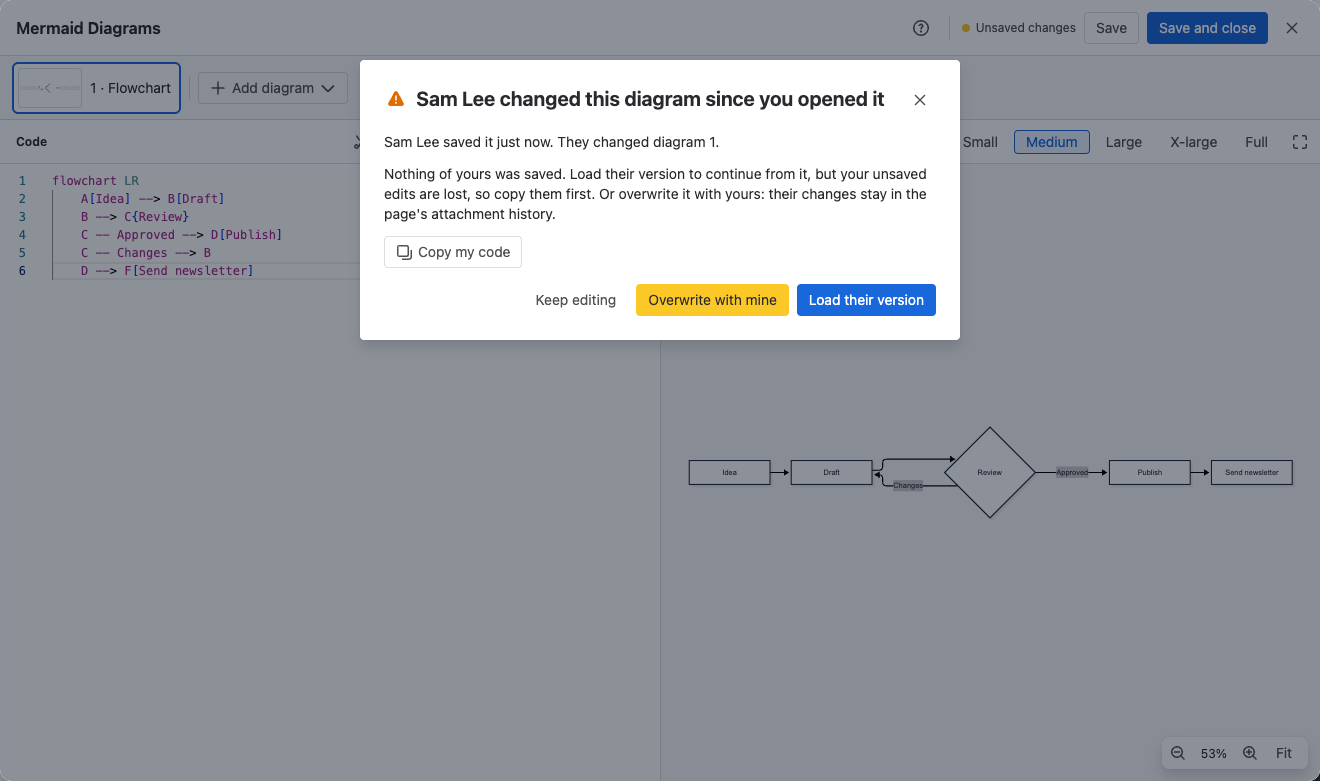
If you saved the same diagram yourself in another browser tab, the dialog says You saved this diagram somewhere else since you opened it here.
Choose what to do
| Option | What happens | Use it when |
|---|---|---|
| Copy my code | Copies your unsaved code to the clipboard. The dialog stays open | You want to keep your changes before you load theirs |
| Load their version | Replaces your unsaved edits with the latest saved diagrams | Their changes matter more, or you'll redo yours on top |
| Overwrite with mine | Saves your version over theirs | You're sure your version should win |
| Keep editing | Closes the dialog and keeps your edits, unsaved | You want to look before you decide |
A safe habit: select Copy my code, then Load their version, and paste back the parts you still need.
In Jira, Overwrite with mine loses the other person's changes for good. In Confluence, their version stays in the page's attachment history, so you can still recover it from there.
Related
- Edit a diagram: saving, unsaved changes and errors.
- Data security and privacy: where Confluence and Jira diagrams are stored.