Error: "This diagram has an error"
Symptom
Instead of the diagram, people who can edit it see This diagram has an error on line and a line number, with an Edit diagram button. Readers who can't edit see This diagram can't be shown.
In the editor, the preview shows The diagram has an error on line and a line number.
Cause
The diagram code has a Mermaid syntax error, so Mermaid can't draw it. Common causes:
- A missing closing bracket, such as
A[Startinstead ofA[Start]. - A misspelled diagram type on the first line, such as
flowchartt. - Wrong indentation in a mindmap or timeline, where indentation sets the structure.
- More than one
---config block, or a config block that isn't the first thing in the code. - Syntax from a Mermaid version newer than 12.1.
Solution
-
Select Edit diagram in the message. The editor opens and shows Mermaid's explanation of the error.
-
In the preview, select Go to line. The line is underlined in the code.
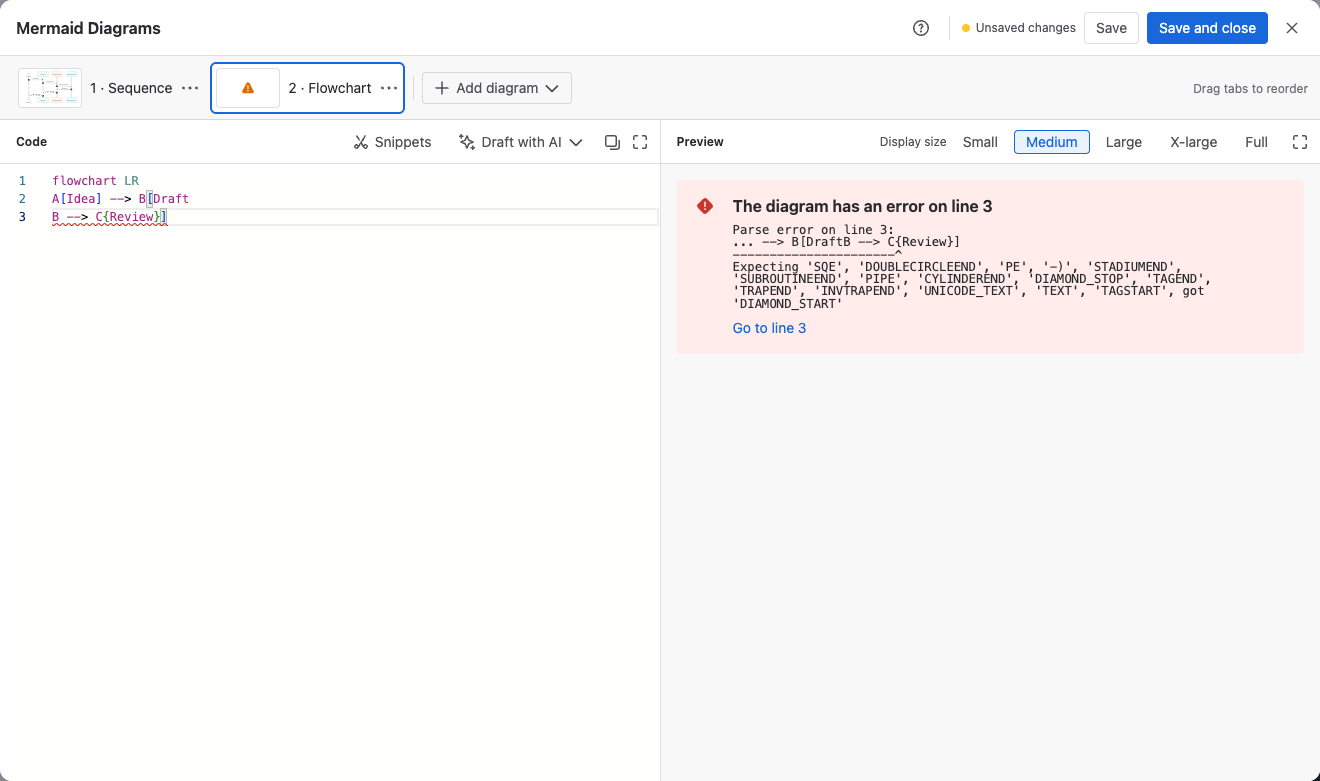
-
Correct the code. The preview draws the diagram as soon as the error is gone.
-
Select Save and close.
To check the syntax for a diagram type, see Supported diagram types. To find the error faster, paste the code into the Mermaid Live Editor, which uses the same Mermaid version.
Still not working?
Contact support with the diagram code and the error message.
Related
- Edit a diagram: errors, Save with an error?, and saving.
- Draft a diagram with AI: ask an assistant to fix the code for you.