The Workflows tab
The Workflows tab lists every workflow that has a Script Master rule on one of its transitions. Use it to find a rule. It also shows which rules still need setup, and how often post functions run and rules fail.
Applies to: Script Master for Jira · Cloud
Before you begin
- Jira permission: Jira admin (the Administer Jira global permission).
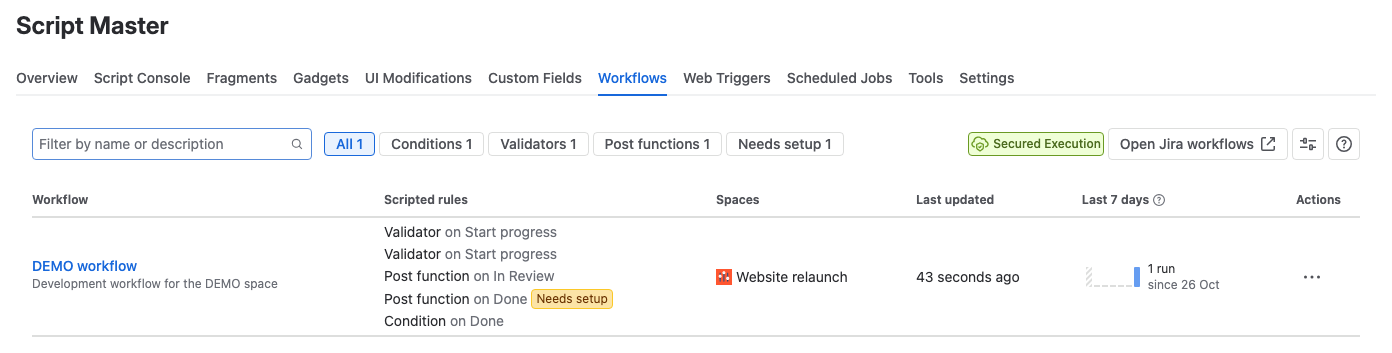
Columns
| Column | What it shows |
|---|---|
| Workflow | The workflow name. has draft means the workflow has unpublished changes. Select the name to open the workflow in Jira's editor. |
| Scripted rules | One line per rule, for example "Validator on Start progress". Select a line to open the workflow editor on that transition. |
| Spaces | The spaces that use the workflow. Select one to open the space. |
| Last 7 days | Post function runs per day on this workflow, and failures. |
| Last updated | When the workflow last changed. |
| Actions | Edit workflow, which opens the workflow in Jira. |
Jira can't link to a single rule. The link opens the transition, and you find the rule in its rules panel.
Rules that need setup
Needs setup next to a rule means it has no script or expression yet, so it does nothing in the workflow. Open it from the link and add one.
What the Last 7 days column counts
- Every post function run, and the post functions that failed.
- Validators and conditions only when Jira couldn't evaluate their expression. Jira doesn't report the ones that pass, or the ones that block or hide a transition as designed.
- Up to 100 a day. Days are in UTC.
Filter the list
- Type in Filter by name or description to search the workflows.
- Select All, Conditions, Validators, Post functions or Needs setup. A kind of rule gets a button only when a workflow on the site uses it.
Add a rule from here
Select Open Jira workflows to go to Jira's workflow list, then pick the workflow and transition. When no workflow has a rule yet, the tab shows No workflow has a scripted rule yet with the same button.
Related
- Add a validator: block a transition until the work item is ready.
- Add a post function: run a script after a transition.
- Run history: the output and errors of recent post function runs.