Test a rule on a work item
Run a validator or condition against a real work item before you save it. The test tells you what Jira would do to the transition, and for a validator it shows the exact message the person would see.
Applies to: Script Master for Jira · Cloud, company-managed and team-managed spaces
Before you begin
- The rule's editor is open in Jira's workflow editor. The Test on a work item panel is next to the rule, or below it in a narrow dialog.
- You need permission to browse the work item you test with.
Run the test
-
In Work item, search by key or summary, and select the work item.
-
Optional: in As, pick the person to test for. The default is You.
-
Select Run test.
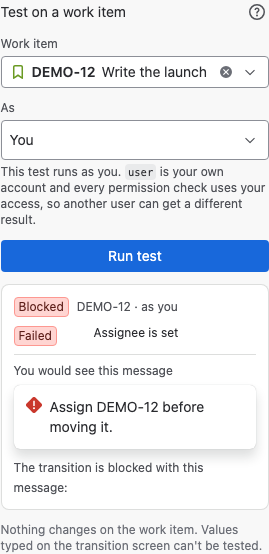
Result: A badge shows what Jira would do, with the work item key and who it ran as.
| Badge | Meaning |
|---|---|
| Allowed | The validator lets the transition through. |
| Blocked | The validator blocks the transition. Under … would see this message, the panel shows the message. If the expression returned false, Jira would show its own default message. |
| Shown | The condition shows the transition. |
| Hidden | The condition hides the transition. |
| Failed to run | Jira couldn't evaluate the expression. A validator then blocks the transition with an evaluation failure, and a condition hides it. |
| Not found | Jira couldn't find the work item, or you can't see it. |
| Couldn't run | The request to Jira failed. The panel shows Jira's answer. |
The test changes nothing on the work item. Earlier runs lists your last five tests, so you can compare work items or people.
See which check failed
For a rule built with rules, the result lists each check as Passed or Failed, with the field's current value. If the rule has Only check when conditions, the result says whether the rule Applies to this work item or was Skipped.
What a test can't show
The test reads data with your permissions. When you test as someone else, Jira uses their account as user, so their groups and space roles count. Jira still reads the work item with your access, so a person who can see less may get a different result.
Some variables are empty in a test. transition and workflow exist only while Jira runs the transition. So do originalIssue in a validator and groupOperator in a condition. When the expression uses one of them, the panel warns that the test will fail there, even if the rule works in the workflow.
A validator test uses the work item as Jira has it now. You can't test values that someone would type on the transition screen.
A test can also show the expression's cost against Jira's complexity limit. A busier work item can cost more, and an expression over the limit fails when it runs.
Related
- Build a rule without code: change the checks after a failed test.
- Workflow validators: the messages a validator can show.
- Workflow conditions: what a condition returns.