Web Triggers
This module is available for both the Jira and Confluence versions of the app.
Web Trigger scripts run on the Forge back end and are executed through Protected Execution by an external Companion App. Until an application administrator configures the Companion App, backend script execution is disabled - the module shows an "Action Required" banner and the scripts do not run. See Secured Scripts Execution for the setup guide.
Web Triggers are JavaScript functions running on the Forge back end that respond to HTTP requests. They connect your Jira or Confluence site to external systems without requiring user authentication.
In Script Master, Web Triggers serve as an extension of Forge Web Trigger.
Setting up Web Triggers
- Go to the Web Triggers tab from the Script Master page.
- Create a new web trigger by writing a JavaScript function.
- Save the web trigger to generate a unique URL.
- Use this URL to handle HTTP requests.
We are using a code editor, which will assist you in writing code more efficiently. Read more about Code Editor features, shortcuts, and more.
- In Jira
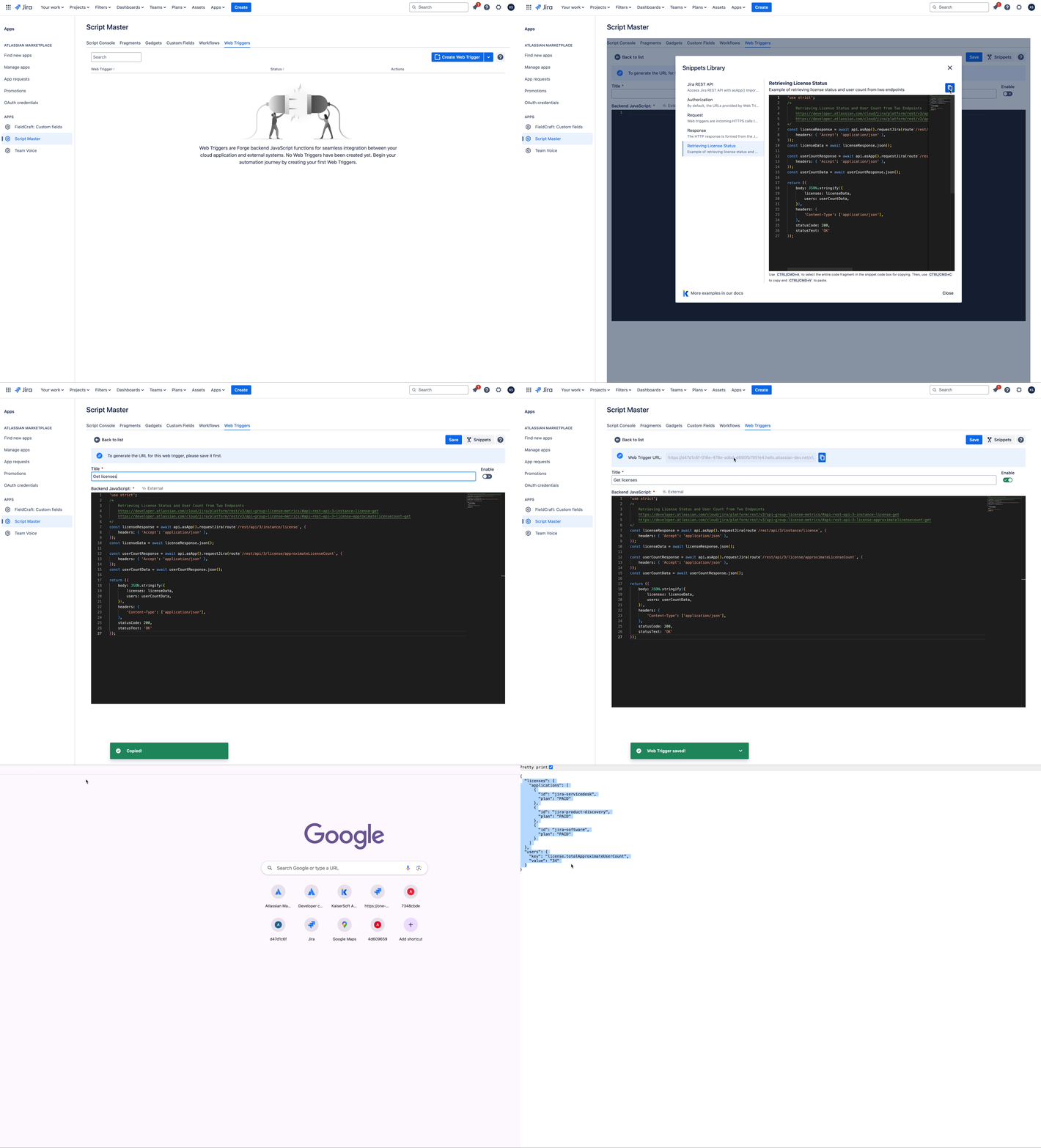
Context
Web Triggers implement Forge backend FaaS function, allowing you to utilize all Bridge API for Forge backend FaaS function. Among the most useful are api and request.
Best practices
- Security Considerations: Validate incoming requests and perform authorized actions within Jira or Confluence applications to ensure security.
- Error Handling: Catch and log errors in the script; an uncaught error returns a 500 to the caller.
- Performance Optimization: Optimize trigger performance for minimal latency and improved responsiveness.
Limitations
Script Master enforces a limit of 20 web triggers per site. When this limit is reached, administrators will see a warning and won't be able to create additional triggers.
The 20-trigger limit is designed to cover most integration scenarios while maintaining optimal performance. Keep in mind:
- No pagination: Since the maximum is 20 triggers, all triggers are displayed on a single page.
- Search functionality: The search feature filters within the existing 20 triggers for quick access.
- Design for flexibility: A single web trigger can handle multiple scenarios by:
- Returning different responses based on input parameters
- Supporting different HTTP methods (GET, POST, PUT, etc.) within the same trigger
- Implementing conditional logic to serve various use cases
If you approach this limit, consolidate triggers by routing on a request parameter or the HTTP method inside a single script.
Key features
- No User Authentication Required: Accessible via a unique URL, so external systems can call Jira or Confluence directly.
- Communication with Jira: Interact with application using the
useApp()method, enabling actions such as work item creation, updates, and workflow triggers. - Scalability and Reliability: Benefit from Forge platform's scalability and reliability for handling a large volume of requests.
Use cases
- Integrating with External Systems: Keep Jira or Confluence in sync with third-party applications or internal tools.
- Automating Workflows: Trigger actions based on specific events or conditions to streamline processes and improve productivity.
- Extending Functionality: Enhance functionality of Jira or Confluence with custom actions or behaviors to meet organizational needs.
Examples
- Authorization. Example of adding a check for an "authorization" header in the request and validating any provided token.
- Calling Jira from a Confluence fragment. A Jira web trigger acting as a proxy, so a Confluence fragment can show live Jira work item statuses despite
requestJiranot being available there.