Audit metadata
Script Master records who created each item and who last changed it, with the date and time of each. On a site where several admins work in the app, this answers who last changed a fragment, and when.
What is recorded
Audit metadata is kept for fragments, gadgets, macros, UI modifications, web triggers and scheduled jobs. Each item has four values:
| Column | What it shows |
|---|---|
| Created by | The person who first saved the item |
| Created at | When the item was first saved |
| Updated by | The person who saved the latest change |
| Updated at | When that change was saved |
Script Master stamps these values on the server when an item is saved, with the account of the person saving. They can't be set or edited from the browser.
Turning an item on or off from the list is a save too, so it updates Updated by and Updated at. An imported or duplicated item counts as created by the person who imported or duplicated it.
For a full record of every change, with the code of each version, use version history.
See who changed an item
Updated by and Updated at show in the list by default. To show or hide the audit columns:
-
In the module's list, select Choose columns (the icon next to the create button). The Show columns menu opens.
-
Select Created by or Created at to show them, or clear a column to hide it.
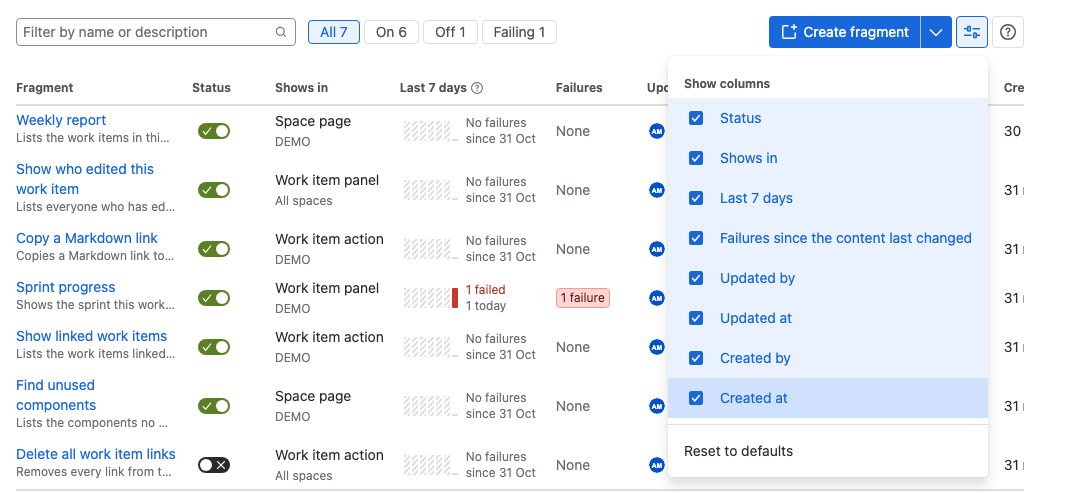
Result: The list shows the columns you chose. Dates show as relative times, such as 2 days ago. Hover over a date for the exact date and time.
Select Reset to defaults in the same menu to go back to the original columns. Your choice is kept in your browser for each list, so it doesn't change what other admins see.
You can sort by Updated at and Created at to find recent changes.
The editor's header shows the same information: Updated by, the person and the date. It's hidden while the editor has unsaved changes.
Items saved before audit metadata
Audit metadata is stamped when an item is saved. Items last saved before Script Master recorded it show a dash (-) in the audit columns. Their next save fills in Updated by and Updated at. Created by and Created at stay empty, because the creation was never recorded.
What is stored
Script Master stores only the Atlassian account ID and the time. Names and avatars come from your site each time the list or editor shows them. If a person's account is deactivated or removed, their name may no longer show.
See Data security and privacy for everything the app stores.
Related
- Version history: every saved version, with who saved it and a note.
- Navigate the admin page: the list toolbar, filters and row menu.
- The Overview tab: the latest saves across all modules.