Add a condition
Put a Scripted Condition on a transition so that only some people or work items see it. This example shows Done only to members of the group "Team Alpha".
Applies to: Script Master for Jira · Cloud, company-managed and team-managed spaces
Before you begin
- Jira permission: for a company-managed workflow, the Administer Jira global permission.
- For a team-managed space, a space admin can add the rule. Only a Jira admin can open its version history.
Add the condition
-
Go to Settings > Work items > Workflows. In the workflow's row, select ⋯ > Edit.
-
Select the transition, for example Done. Its rules panel opens.
-
In the rules panel, select Add restrict transition rule.
-
Select Scripted Condition, then Select. The Script Master editor opens in the dialog, with Build with rules selected.
-
Under Start from a template, select Only some groups, and pick
Team Alphain the check's value.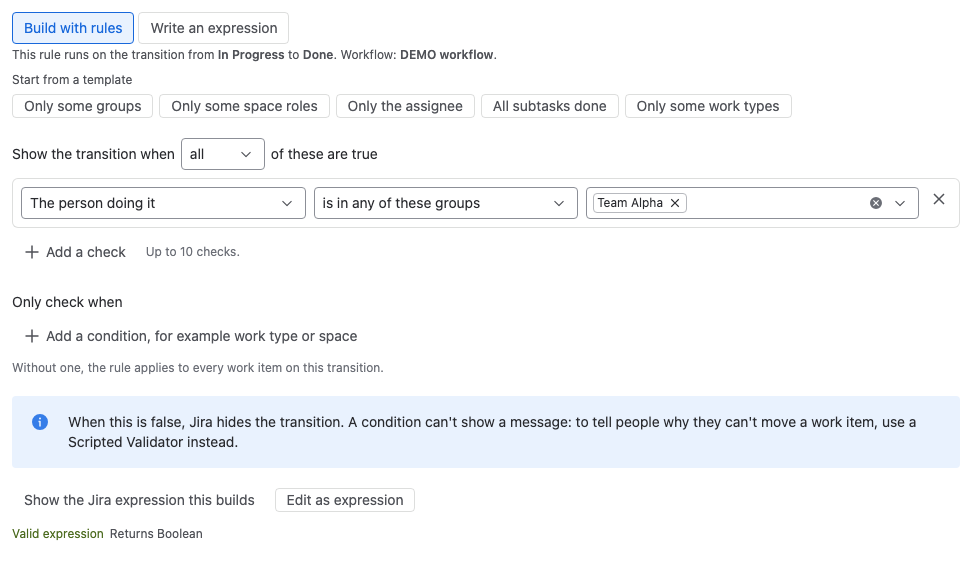
-
In Test on a work item, pick a work item, choose a person under As, and select Run test. The result reads Shown or Hidden.
-
Select Add, then Update workflow to publish the change.
Result: Done appears only for members of Team Alpha. In the transition's rules panel, the rule reads "The person doing it is in any of Team Alpha".
Change a condition
- Open the workflow in the editor as above, and select the transition.
- In the transition's rules panel, select the rule's card. The Edit Rule dialog opens on the Summary tab: This scripted workflow extension is configured, and the script looks excellent. A rule built with rules also shows the rule in plain words. Select expand to see the expression.
- Select the Edit tab. Script Master opens the rule the way you saved it: as rules, or as an expression.
- Change the rule and select Update.
- Select Update workflow to publish the change.
To go back to an earlier version, select Version history in the editor. See Version history.
A rule with no expression yet says This scripted workflow extension has not been configured yet and will not affect your workflow. The transition stays visible until you set it up.
Related
- Workflow conditions: what a condition returns and which variables it can use.
- Build a rule without code: every check and template.
- Test a rule on a work item: test as another person before you save.