Embed a shared page in another site
Show a shared work item, board or filter inside another website, such as an intranet page, with the <iframe> code from the share window. Embedding is off for every link until you turn it on.
Before you begin
- App permission: you can change the link. That's the person who created it, a Jira admin, or anyone the Who can manage other people's links setting includes.
- Your Jira admin hasn't turned embedding off for the site. It's on by default, under Embedding on the Sharing Policy tab.
- The other site must allow
<iframe>elements in its pages.
Embed a link
-
Open the link's settings in the share window.
-
Select the Access tab, then turn on Allow other sites to embed this page.
-
Select Save changes. The link bar shows an Embeddable chip.
-
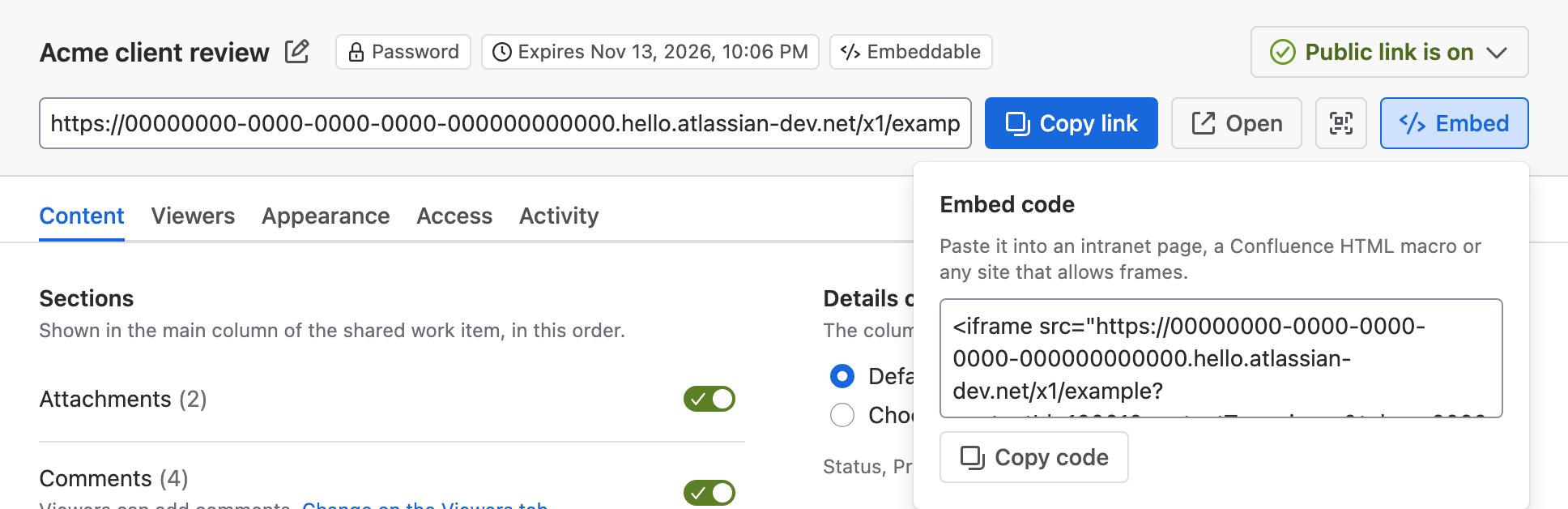
In the link bar, select Embed. The Embed code opens.
-
Select Copy code, then paste the code into the other site's page.
Result: The other site shows the shared page in a frame, 600 pixels high and as wide as the page. Change height="600" in the code to fit the space.
<iframe src="<link-url>" width="100%" height="600" style="border:0" title="Shared from Jira"></iframe>
| Placeholder | Description |
|---|---|
<link-url> | The link's URL, filled in for you when you copy the code |
For a page that fits a small frame, pick the Embed theme on the Appearance tab. It's more compact and links to the full page. See Choose a theme and accent color.
While embedding is on, any website can show the page. If the link has a password, viewers type it into a frame on someone else's site. Turn embedding on only for links you mean to embed.
Stop embedding a link
- On the Access tab, turn off Allow other sites to embed this page.
- Select Save changes.
Result: Other sites can no longer show the page. The link itself keeps working when opened directly.
Limitations
- You can't limit embedding to particular sites. While it's on, every site can frame the page.
- The preview in the share window isn't framed by another site, so it can't show whether embedding works.
- If your Jira admin turns embedding off for the site, no link can be framed, whatever its own setting. Turning it back on restores each link's choice.
Related
- Choose a theme and accent color: the Embed theme for small frames.
- A shared page doesn't show in a frame: what to check when the frame stays empty.
- Sharing policy settings: the site-wide embedding switch.