Check a job's runs and failures
Look up what each run of a scheduled job returned and printed, and why a run failed.
Applies to: Script Master for Jira and Script Master for Confluence · Cloud
Script Master records every run of a scheduled job, failed runs included, whether the schedule or Run started it. Each job keeps its last 10 runs. Tests aren't recorded.
Before you begin
- Jira or Confluence permission: Jira admin (the Administer Jira global permission) or Confluence admin.
Open a run
-
On the Scheduled Jobs tab, find the job in the list.
-
In the History column, select a dot. The dots are the job's runs, oldest on the left: green for a success, yellow when the run logged a warning, red for a failure.

The job's editor shows the same dots above Title, under Recent runs:.
-
Read the run's details. The dialog's title names the run's date and time.
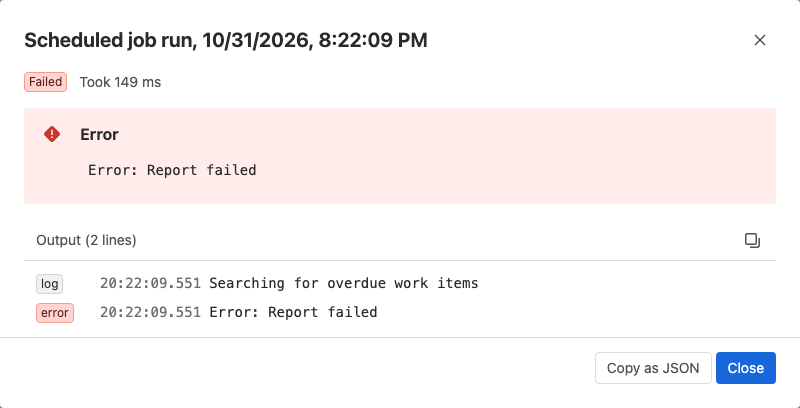
Result: The dialog shows:
- Failed or Succeeded, and how long the run took, for example Took 1.2 s,
- an Error panel, for a failed run,
- Returned, the value the script returned (up to 2,048 characters),
- Output, the lines the script printed, with their level and time.
Select Copy as JSON to copy the whole run, for example for a support request.
A job with no runs yet shows no runs yet. A run started with Run appears after it finishes. Select Refresh above the list to see it.
What a failed run tells you
A run fails when the script throws an error or the job can't run at all. Each failure is recorded, with the reason in Error:
| Error shows | What happened | What to do |
|---|---|---|
| The script's own error message | The script threw an error. | Fix the script, then try it with Test. Server runs don't report the line number. |
Local script execution is not supported. | No Companion App is set up. | See Set up the Companion App. |
Starts with Remote execution failed | The Companion App didn't answer, or answered with an error status. | Check the Companion App in Script Master's Settings. |
Starts with Scheduled job skipped: | Script Master couldn't read the job's schedule. | Open the job, fix Schedule and save it. |
A run that printed an error with console.error() but didn't throw shows Succeeded, with a red dot in History.
Activity over the last week
The Last 7 days column counts runs per day, with failed runs in red. It includes runs started with Run. Days are in UTC. See Run history.
Related
- Test or run a job now: try a fix before the next scheduled run.
- Failures: how Script Master shows failing items across modules.
- Schedule a job with cron: when a job runs, and why a run can be late.