Review and turn off links across the site
As a Jira admin, find every public link on your site, whoever created it, and turn off the ones that are no longer needed. The audit log shows who shared what, and when.
Before you begin
You need to be a Jira admin. Open the admin page: select Settings (the gear icon) > Apps, then select Share Public Link in the sidebar.
Find links
-
Select Shared Work Items, Shared Boards or Shared Filters. The tab lists every link of that kind on the site, 100 at a time.
-
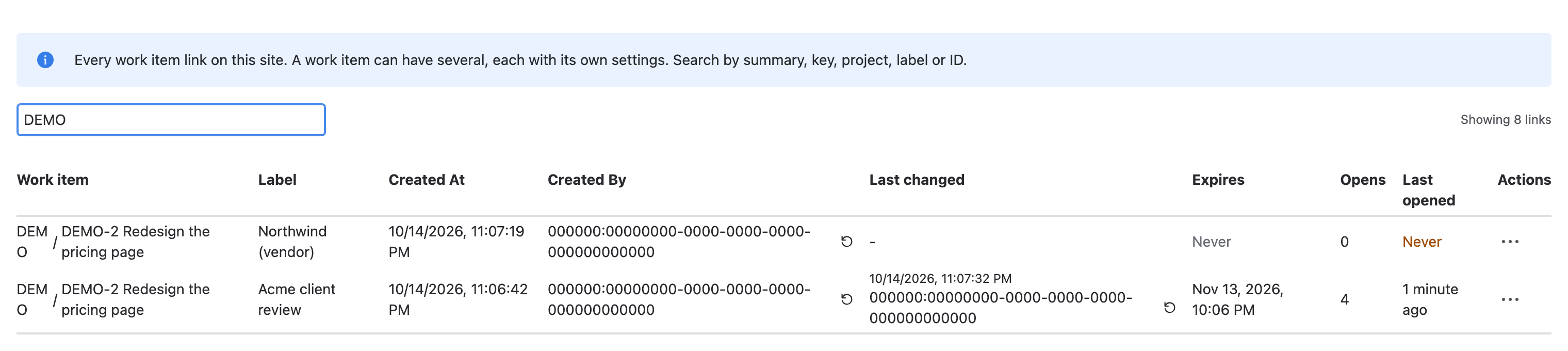
Optional: enter a name, key, space, label or ID in the search box.
-
If the count under the table reads Showing the first 100 links, select Load more to add the next 100.
Result: Each row is one link, with its label, who created it, who changed it last, when it expires, and how often it was opened.
Search covers only the links already loaded. If a link is missing from the results, select Load more: the search runs again on the longer list.
| Column | What it shows |
|---|---|
| Work item, Board or Name | What the link shares, by the name it had when the link was last saved |
| Label | The link's private label, if it has one |
| Created At, Created By | When the link was created, and by whom |
| Last changed | When the link's settings last changed, and by whom |
| Expires | Never, the expiry date, Expires and the date in a label when it's due within 24 hours, or Expired and the date |
| Opens, Last opened | How often the link was opened, and when. Never in amber means nobody opened it. Shown while link activity is on |
Turn off a link
-
In the link's row, under Actions, select ⋯.
-
Select Turn off link. A confirmation opens and names the link.
-
Select Turn off link to confirm.
warningThe URL stops working at once, for everyone who has it, and this can't be undone. The link's settings and activity are deleted.
Result: The row disappears, and viewers who open the URL see This link isn't active.
Look for links whose Expires column reads Never, and links nobody opened. They're the ones most likely to outlive what they were made for.
Review the audit log
Select the Audit Logs tab. It lists who created, changed and turned off work item, board and filter links, newest first, with the time. Search by name, content ID, action or user.
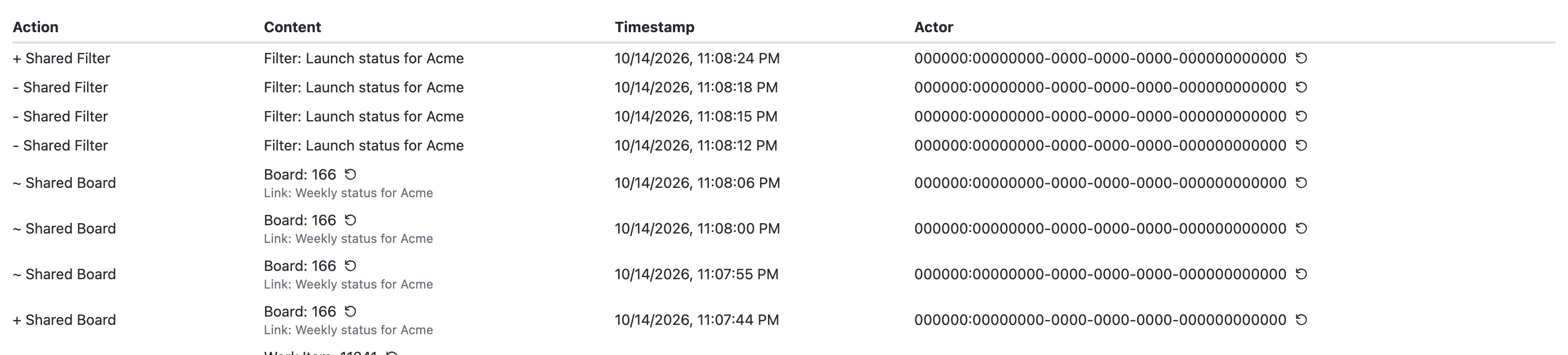
The Content column can show IDs at first. Select the reload icon next to an ID to show the name of the work item or board. The Actor column shows each person's name. Comments posted from a shared page appear with Link viewer as the actor.
The audit log keeps the newest 100 events.
Limitations
- The tables can't be sorted by Opens.
- There's no way to turn off many links at once. Turn them off one by one.
- Setting Disable for everyone or a maximum lifetime doesn't change existing links. See Sharing policy settings.
Related
- Sharing policy settings: who can share, and what.
- Link activity: the open counts behind the Opens column.
- Turn off or replace a link: what link creators can do in the share window.