Start from a template
Start a UI modification from a ready-made template, then adapt it to your site. Six templates cover common form changes; five use rules and one is a short script you can read before you write your own.
Applies to: Script Master for Jira · Cloud
Before you begin
- Jira permission: the Administer Jira global permission.
- App permission: a valid Script Master license.
Create from a template
-
In Script Master, select the UI Modifications tab.
-
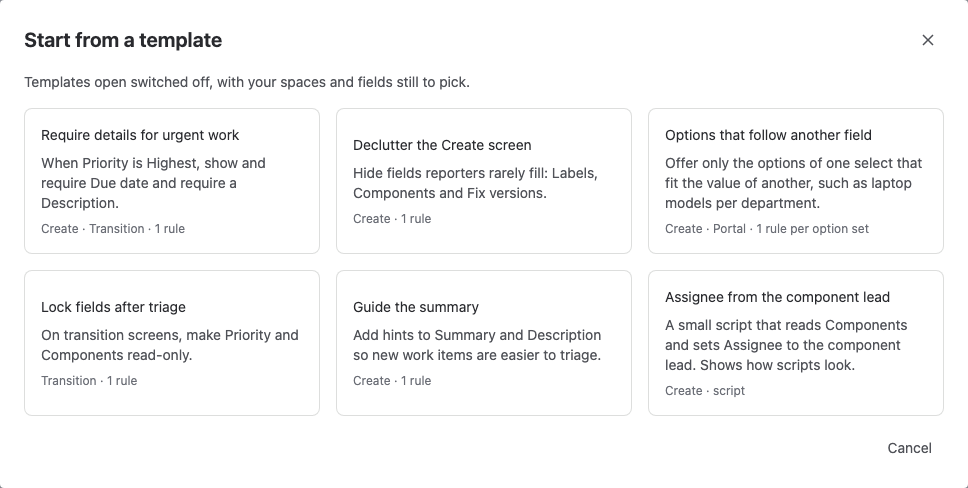
Select the arrow next to Create UI modification (More ways to create) and select From a template. The Start from a template dialog opens.
On a site with no UI modifications yet, the tab shows four common tasks instead. Select one to open its template.
-
Select a template. The editor opens with it, switched off.
-
In Where it runs, pick the spaces and work types. A template has none picked, so it can't change a live form until you choose them and switch it on.
-
Check the rules, or the script, and pick any fields the template leaves empty.
-
Turn on Enable, then select Save.
Result: the UI modification runs on the forms and spaces you picked.
The templates
| Template | What it does | Forms |
|---|---|---|
| Require details for urgent work | When Priority is Highest, shows and requires Due date, and requires Description. | Create, Transition |
| Declutter the Create screen | Hides Labels, Components and Fix versions. | Create |
| Options that follow another field | Offers only the options of one select that fit the value of another. You pick both fields and the options. | Create, Portal |
| Lock fields after triage | Makes Priority and Components read-only. | Transition |
| Guide the summary | Adds hints to Summary and Description. | Create |
| Assignee from the component lead | A short script that sets Assignee to the lead of the picked component. | Create |
The four tasks on the empty tab open these templates:
| Task | Template |
|---|---|
| Require a field when another has a value | Require details for urgent work |
| Hide fields people rarely fill | Declutter the Create screen |
| Lock fields after triage | Lock fields after triage |
| Guide people with hints | Guide the summary |
Add a template's rules to your UI modification
In the editor of a rules UI modification, select Add from a template above the rules. Pick a template in the Add rules from a template dialog. Script Master adds its rules after yours and leaves your scope and settings as they are. This dialog offers rule templates only, so the script template isn't in it.
Related
- Create a UI modification with rules: build one from scratch.
- Conditions and actions: what each rule in a template does.
- Write a UI modification script: adapt the Assignee from the component lead script.