Create a field from a recipe
Create a ready-made field from a recipe, and check its value on one of your work items before you create it.
A recipe is a field type with settings already chosen, such as Cycle time or Reopen count.
You can change every setting later.
Before you begin
-
Jira permission: Jira admin (the Administer Jira global permission).
-
FieldCraft: installed, with an active license.
-
Some recipes need a work calendar, Jira Service Management, a story points field, the Sprint field or the Blocks link type. See Field recipes.
Pick a recipe
-
Go to Settings (⚙) > Marketplace apps > FieldCraft: Custom Fields, and open the Fields tab.
-
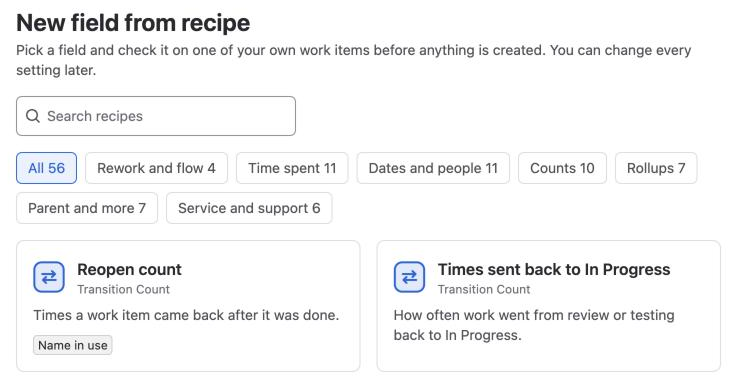
Select New field from recipe. The recipe gallery opens.
-
Select a category, for example Time spent, or type in Search recipes.
-
Select a recipe card. The recipe form opens.
Each card shows the field type and a summary.
Added means you already made a field from this recipe.
Name in use means a field of the same type already has this name.
Fill in the form
The form shows only the sections the recipe needs, and numbers them in order.
-
Under Name the field, keep or change Field name. Add a Description if you like; Jira shows it next to the field.
-
Under Statuses, check the statuses the form picked. You can pick Any To Do status, Any In Progress status or Any Done status to cover every status of that category.
-
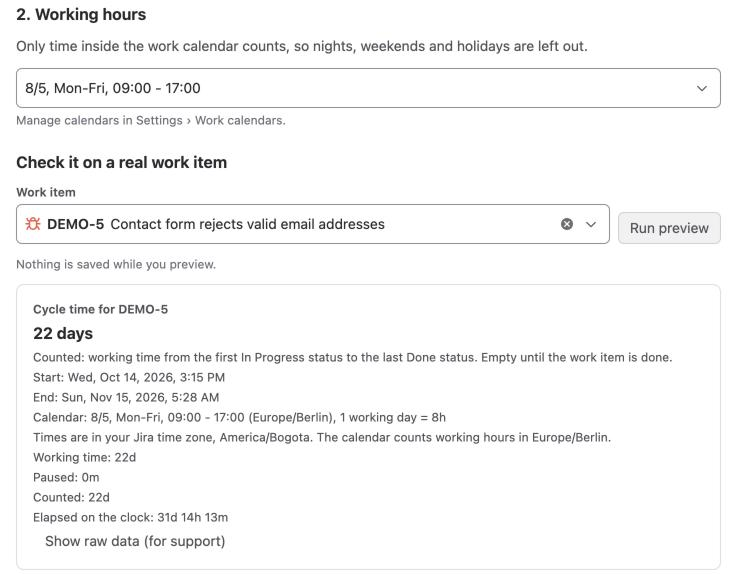
Under Working hours, select a work calendar. If you have none yet, select Create 8/5, Mon to Fri, 09:00 to 17:00 to create one in the time zone shown on the button (your Jira profile's).
-
Under Check it on a real work item, enter a work item key and select Run preview. You see the value for that work item, and FieldCraft saves nothing.
-
Under Show it on screens, select the screens where your teams should see the field. This step is optional.
-
If you see Calculated with the app's access, read the notice and select its checkbox. See Acknowledge app access.
-
Select Create field.
Until the form is complete, you can't select Create field.
The hint next to the button tells you what's missing.
Result: FieldCraft creates the field with one context for all spaces and work types, and says it's ready, for example Cycle time is ready.
What's next
The success page lists what FieldCraft set up, and offers three next steps.
| Card | What you can do |
|---|---|
| Fill in existing work items | Select Fill last 90 days to calculate values on work items created in the last 90 days or still open. It runs in the background, so you can close the page |
| Use it in search and dashboards | Select Open in search or Copy JQL to use the recipe's JQL example |
| Fine-tune it | Select Edit configuration to open Jira's context list for the field, or open the recipe's guide |
To make another field, select New field from recipe.
Related
-
Field recipes: every recipe, what it measures and its JQL example.
-
Configure a field: change the settings after you create the field.
-
Recalculate existing work items: fill in values on older work items later.
-
Create a field in Jira settings: create a field type no recipe covers.