Recalculate existing work items
Recalculate existing work items to fill in a new field, or to update values after you change a field or a work calendar.
FieldCraft calculates a value when a work item changes or someone opens it. A reindex covers the work items that nobody touches.
Before you begin
-
Jira permission: Jira admin (Administer Jira global permission).
-
FieldCraft: installed, with an active license.
-
You have acknowledged the fields that read data with the app's access. A reindex leaves out fields that still wait for your review. See Acknowledge app access.
Start a reindex
-
Go to Settings (⚙) > Marketplace apps > FieldCraft: Custom Fields, and select the Calculation tab.
-
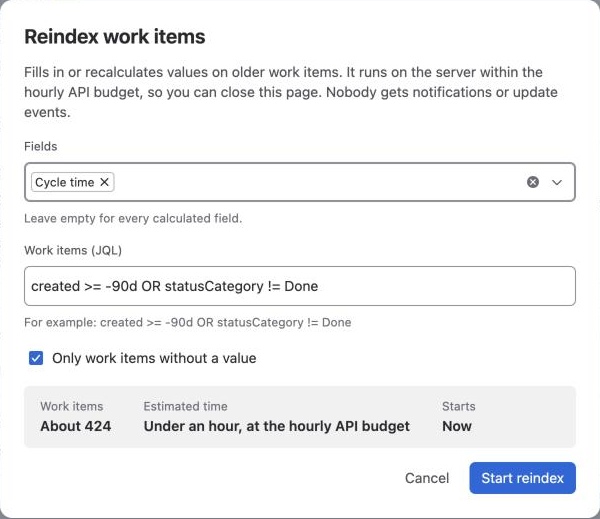
Select Reindex. The Reindex work items dialog opens.
-
In Fields, select the fields to recalculate. Leave it empty for every calculated field.
-
In Work items (JQL), enter the work items, for example
created >= -90d OR statusCategory != Done. -
To fill in only missing values, select Only work items without a value. Clear it to recalculate every value.
-
Check the estimate. It shows the number of Work items, the Estimated time at the hourly API budget, and when it Starts.
-
Select Start reindex. If another reindex runs, select Add to queue.
Result: You see Reindex started or Added to the queue. The reindex runs on the server, so you can close the page.
Nobody gets notifications, and no work item gets a history entry.
Suggested updates
After you create a field, save its configuration or change a work calendar's working time, FieldCraft suggests an update in Needs your attention.
Each suggestion covers work items created in the last 90 days or still open, and shows you an estimate.
For a new field, it fills in only empty values.
If you save a new field's first configuration more than two minutes after you created it, the suggestion is an update of every value instead. Work items that changed in between hold values calculated with the type's defaults.
-
Select Fill in or Update to start it.
-
Select Change scope to open the Reindex work items dialog with the suggestion filled in.
-
Select Not now to dismiss it.
When you create four or more fields, their suggestions appear as one row, Fill in N new fields. Select Fill in all to run them in one reindex, or Show each.
Follow the progress
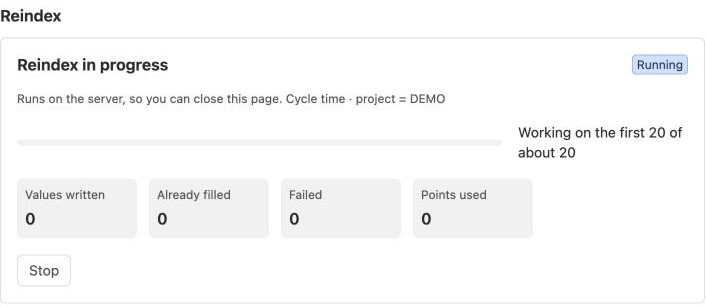
The Reindex section of the Calculation tab shows you the running reindex: N of about M work items, Values written, Already filled, Failed and Points used.
-
Waiting for next hour's budget means the reindex continues at the next UTC hour. See Hourly calculation budget.
-
Select Stop to end it. Values written so far stay.
-
Select Retry N failed to recalculate only the work items that failed.
Up to 5 reindexes wait in Waiting to run, in order. Select Remove to take one out of the queue.
Finished reindexes move to the Activity tab. A reindex with failures stays on the Calculation tab until you retry or dismiss it.
Recalculate one space
A space admin can recalculate every work item in their own space, without a Jira admin. See See FieldCraft fields in a space.
Related
-
How values stay current: when FieldCraft calculates values on its own.
-
Follow runs on the Activity tab: see finished reindexes.
-
A reindex says "Waiting for next hour's budget": why a reindex pauses.
-
Some values failed to calculate: find out why a work item failed.