Build a script with AI
Ask an AI assistant to write a script for you. Build script with AI gives the assistant a link to the API reference of the module you're in, and the assistant then asks what you need.
It's in the Script Console and in the editors of fragments, gadgets, macros, web triggers and scheduled jobs.
Before you begin
- You need the Administer Jira global permission, or Confluence administrator rights.
- You need access to an AI assistant. Script Master doesn't call any AI service itself.
Build a script
-
Open the item's editor, or the Script Console.
-
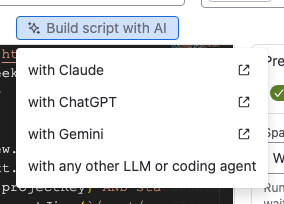
Above the code, select Build script with AI. A menu opens.
-
Select with Claude, with ChatGPT or with Gemini. The assistant opens in a new browser tab with the prompt filled in.
-
Send the prompt. The assistant reads the API reference and asks what you want to build.
-
Describe the script, for example
A fragment for the work item panel that lists the linked work items and their status. -
Copy the code the assistant writes into the Script Master editor.
-
Test it, then select Save.
Result: The item holds the assistant's code. Check what the code does before you turn the item on: the assistant can make mistakes.
Use another assistant or a coding agent
- Select Build script with AI > with any other LLM or coding agent. A dialog opens with the prompt.
- Select Copy prompt.
- Paste the prompt into your assistant, coding agent or terminal app, and describe the script you need.
What the prompt says
The prompt is two sentences: a link to the module's API reference, and a request to ask you what to write. For fragments it reads:
Read the Fragments API reference: https://docs.apportunity.xyz/script-master/code-editor/fragments-ai-prompt

Once you've reviewed it, ask me what fragment to write.
It holds nothing from your site. What you then tell the assistant goes to that AI service under its own terms.
The API references are written for AI assistants, and you can read them too:
- Script Console API reference for AI
- Fragments API reference for AI
- Gadgets API reference for AI
- Macros API reference for AI
- Web Triggers API reference for AI
- Scheduled Jobs API reference for AI
Related
- Code editor: editor features, snippets and shortcuts.
- Edit in an external editor: let a coding agent edit a file that Script Master loads.
- Version history: go back if a generated script doesn't work.