Roll up story points to epics
See on every epic the story points of its children, how many of them are done, and how far along you are.
Problem: Story points live on stories, but you plan and report on epics. Adding them up by hand takes time and is out of date by the next standup.
Solution: You create three Rollup fields from recipes: Story points on the epic, Completed story points and % of points done. FieldCraft updates them on the epic whenever a child changes.
What you'll need
-
FieldCraft, installed, with an active license.
-
The Administer Jira global permission, to change settings and create the fields.
-
A story points field on your site, Story Points or Story point estimate. The recipes find it for you.
-
Epics with estimated stories, tasks or bugs as their children. Only direct children count, not their sub-tasks.
What your team will experience
-
A developer estimates a story at 5 points. Shortly after, Story points on the epic on its epic goes up by 5.
-
The story moves to Done. Completed story points and % of points done go up on the epic.
-
As the project manager, you open the epic and see a progress bar. In search, you find every epic under 50% done.
Set it up
1. Check the calculation settings
-
Go to Settings (⚙) > Marketplace apps > FieldCraft: Custom Fields. The FieldCraft admin page opens.
-
On the Settings tab, select Calculation.
-
Make sure that Recalculate when work items change and Update parents and children are on.
Without Update parents and children, an epic follows its children only when you open it or run a reindex.
2. Create Story points on the epic
-
On the Fields tab, select New field from recipe. The recipe gallery opens.
-
Select the Rollups category, then Story points on the epic. The recipe form opens.
In the side panel, Reads story points from names the fields the recipe found.
-
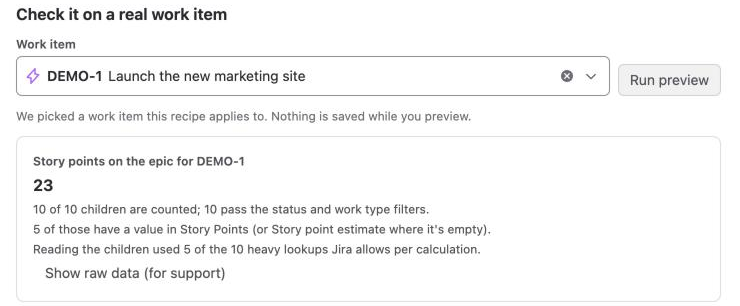
Under Check it on a real work item, enter the key of an epic, and select Run preview.
-
Read the notice Calculated with the app's access, and select I understand, and the values may be shown to everyone who can see the work item.
-
Select Create field, then Fill last 90 days.
The notice matters because FieldCraft reads the children with the app's access. Everyone who can see the epic sees the total, including points from children they can't open.
3. Create the other two fields
-
Select New field from recipe, then Completed story points.
-
Confirm the app access notice, select Create field, and select Fill last 90 days.
-
Repeat steps 1 and 2 for % of points done.
4. Show a progress bar in lists
The epic itself shows % of points done with a progress bar. Lists show only the percentage, unless you add a display rule.
-
On the Fields tab, open the ••• menu of % of points done, and select Edit configuration.
-
Under Display, select Progress bar, full at a number you choose.
-
Keep
100in Full at, and select Save.
5. Find epics that fall behind
-
In Jira's search, run this JQL:
issuetype = Epic AND "% of points done" < 50 AND statusCategory != Done ORDER BY "% of points done" ASC -
Save the filter, and add it to your dashboard with a Filter results gadget.
Check that it works
-
Open one of your epics, and note its Story points on the epic.
-
Change the story points of one of its children.
-
Wait about a minute, and reload the epic you opened. Confirm that the total changed by the same amount.
-
Move that child to a Done status. Confirm that Completed story points and % of points done go up.
FieldCraft updates the epic 20 seconds after its children stop changing, and at most 5 minutes after the first change.
Related use cases
-
Rollup: sums, counts, averages and which children count.
-
Acknowledge app access: what the notice means and who can confirm it.
-
Flag work that is close to its due date: add countdowns to the same epics.
-
FieldCraft settings: the calculation switches, including parents and children.