Jira Expressions - Text
A Jira Expressions - Text field stores the text that your Jira expression returns, such as 3/5 done for sub-task progress.
To search by a number, a date or a person, use the Number, Date or User type instead.
FieldCraft runs the expression with the app's access. A Jira admin must acknowledge app access first.
What you see
On the work item, you see the text.
If the expression returns nothing, you see None. The hover then says Empty when the Jira expression returns nothing for this work item.
Lists, search and exports use the stored text.
Settings
| Setting | What it does | Default |
|---|---|---|
| Jira Expression: | The expression that FieldCraft runs for each work item | None, so you write one |
The expression must return text. A number, true or false, a list or an object leaves the field empty.
To turn a result into text, add + '' after a number, or use join(', ') on a list.
Unlike the other expression types, this type has no check when you save. Check the expression on a work item first.
Example: sub-task progress
You want each story to show how many of its sub-tasks are done.
-
Create the field from the Sub-task progress recipe, or open the configuration page of a Jira Expressions - Text field.
-
In Jira Expression:, enter this expression:
issue.subtasks.length == 0? '': `${issue.subtasks.filter(subtask => subtask.status.category.key == 'done').length}/${issue.subtasks.length} done` -
Select I understand, and the values may be shown to everyone who can see the work item, and select Save.
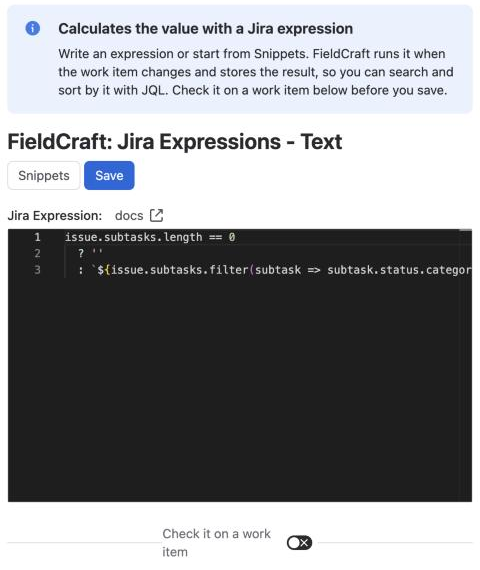
Result: A story with five sub-tasks, three of them done, shows 3/5 done. A story without sub-tasks shows None.
For the editor, snippets and checks, see Write a Jira expression.
Search with JQL
The value is text, so JQL matches it exactly with = or !=. A search with ~ finds nothing.
To find open work items with sub-tasks, use:
"Sub-task progress" IS NOT EMPTY AND statusCategory != Done
When the value updates
FieldCraft runs the expression again when the work item changes or when you open it. See Jira expressions.
Things to know
-
Until a Jira admin acknowledges app access, the field keeps its last value.
-
Everyone who can see the work item sees the text, even if it comes from data they can't open.
Related
-
Write a Jira expression: use the editor, snippets and the check before you save.
-
Parent Field: show a field of the parent as text, kept current as the parent changes.
-
Jira expressions on the Atlassian developer site: the language and its objects.